PEMF session controls are workflow tools that let you start, adjust, monitor, pause, or end a timed session on a home-use device. They manage timing and input behavior. They do not show how strong a session is, prove safety, or establish whether any setting is appropriate for a health outcome.
If you are comparing PEMF mats or devices and trying to understand what all the timer settings, displays, and buttons actually do, this page explains the controller as what it is: a practical operating interface. Every feature covered here—fixed timers, adjustable timers, countdown displays, auto-shutoff, pause behavior, app control, lock states—is explained in terms of what it does during ownership, what it changes for usability, and what it does not prove about results.
PEMF Advisor publishes buyer-oriented reviews, comparisons, and educational content for home-use PEMF mats and devices. This page is a constrained controller-literacy explainer within that system: it focuses only on how buyers should interpret timers, session controls, and interface behavior on product pages, not on treatment guidance, diagnosis, or condition-based session recommendations.
If you want the broader controller and specification context around presets, manual controls, frequency, intensity, and disclosure quality, use our PEMF Specs & Controller Explained guide. This page supports that larger framework by isolating one narrower layer of ownership: how timer logic, session controls, and interface features affect daily use and comparison clarity.
What PEMF Session Controls Actually Do
A PEMF controller is the part of the device a buyer interacts with to operate a session. It may be a handheld unit connected by a cord, a wireless remote, or a companion smartphone app. Regardless of form, its job is the same: accept input, manage session timing, and provide feedback during use.
Controllers differ in how they accept input (physical buttons, digital keypads, touchscreens, or app interfaces), how they display session status (LED lights, LCD screens, or app dashboards), and how they handle session flow (start, pause, resume, stop). Some are minimal—a dial and a power switch. Others show countdown clocks, mode indicators, and confirmation prompts.
The common thread is that every PEMF controller manages session workflow. It does not guide treatment. It does not indicate field strength. Understanding this distinction early makes it easier to evaluate features without reading meaning into specifications that do not carry it.
The Controller as a Workflow Tool Rather Than a Treatment Guide
When you press start on a PEMF controller, you are initiating a timed session—not selecting a treatment. The controller manages when the session begins, how long it runs, and when it stops. On some devices, it also handles confirmation steps (press-and-hold to start, or confirm-to-begin prompts) that prevent accidental activation.
Timer logic splits into two categories at the workflow level. Fixed-timer devices run a pre-set duration every time. Adjustable-timer devices let you choose a session length within a defined range. Both are methods of time management, not methods of outcome selection.
Some PEMF product pages describe pre-programmed durations as if they are optimized for specific goals—sleep, recovery, energy, and so on. These claims attach therapeutic meaning to what is mechanically a time setting. This page treats session duration as a device specification, not as evidence that a particular length produces a particular result.
| Key Distinction
What the controller does: Starts, times, pauses, and ends a session based on user input. What the controller does not do: Indicate field strength, validate safety, or prove that a setting is appropriate for any health outcome. |
A Fast Buyer Check for Session-Control Transparency
Before treating a controller as easy to evaluate, check four things: whether the device shows the selected session length clearly, whether the controller confirms active versus paused versus stopped states, whether timer changes require a confirmation step, and whether the session can be monitored without guessing from a single blinking light or vague icon. If those layers are missing, the controller may still be usable, but the interface is less transparent during ownership.
This matters because timer and session features are often presented as convenience signals while the actual workflow remains unclear. A controller becomes easier to compare when the buyer can tell how the session starts, how it progresses, how it pauses, and how it ends without relying on interpretation.
Physical Controls vs Digital Controls
The way you set session timing depends on the controller’s input method. There are several common types, and each affects ownership comfort differently.
Mechanical dials are analog-style rotary controls. You turn the dial to set approximate session time. They are simple and require no screen, but they offer limited precision—the markings are often in broad increments, and the exact time selected can be difficult to read.
Membrane buttons and keypads are flat, sealed input surfaces common on mid-range controllers. They offer fixed step increments (often 5 or 10 minutes per press) and are easy to clean, though tactile feedback can be minimal.
Digital keypads and touchscreens appear on higher-end controllers and companion apps. They allow finer time adjustments, often in 1-minute increments, and may show additional session metadata on screen.
Mobile app input routes control through a paired smartphone. This can expand the available settings and provide visual feedback beyond what a small on-device screen offers, but it also introduces connectivity dependencies.
None of these input methods change what the device outputs during a session. A digital keypad does not make the electromagnetic field stronger than a mechanical dial does. The difference is in how precisely and comfortably you can set and adjust time.
| Control Type | Ownership Implication |
| Mechanical dial | Simple to operate; limited precision; no screen dependency |
| Membrane buttons | Durable, sealed surface; step-based increments; minimal tactile feedback |
| Digital keypad / touchscreen | Fine increments; richer display; more interface complexity |
| Mobile app | Expanded settings and visuals; requires pairing and connectivity |
Informational Feedback: Countdowns, Indicators, and Prompts
Once a session is set and running, the controller communicates back to the user through its display and alert systems. The depth of this feedback varies significantly across devices.
At the most basic level, some controllers show only a countdown clock—remaining minutes and seconds until the session ends. Others add status indicators (a light or icon confirming the session is active), mode labels (if the device supports multiple operating modes), and prompt states (confirmation needed, session paused, session complete).
Audible alerts are another feedback layer. A beep at session start, a tone when paused, or a chime at session end can help users who are not watching the display—for example, during use while resting with eyes closed.
Display depth matters for usability and operational confidence. A controller that shows a countdown clock and nothing else leaves the user guessing about whether the session is actually active or what mode is running. A controller that shows active status, remaining time, and a confirmation prompt before starting provides more transparency during use.
That said, richer displays do not validate the session itself. A detailed LCD screen with multiple data fields makes the device easier to monitor. It does not make the session safer or more effective.
| Display Level | What the User Sees |
| Clock-only | Remaining time only; no status or mode confirmation |
| Clock + status indicator | Remaining time plus active/paused confirmation |
| Status-rich (LCD/app) | Time, mode, status, prompts, and possibly session history |
Fixed Timers vs Adjustable Timers
The most fundamental timing distinction across PEMF controllers is whether the session length is fixed by the device or adjustable by the user. This affects daily operation, repeatability, and the level of input required before each session.
A fixed timer runs for a pre-set duration every time the device is started. The user does not choose how long the session lasts—it is determined by the product’s design. An adjustable timer gives the user a range (for example, 10 to 60 minutes) and lets them select a duration within that range before starting.
Both types are described entirely as product specifications here. A fixed 30-minute timer tells you how long the device runs. It does not tell you whether 30 minutes is the right length for any particular situation. An adjustable range of 1–90 minutes tells you what the device allows. It does not tell you what setting to choose or what choosing a longer or shorter session will change about the output.
What a Fixed Timer Means for Ownership and Repeatability
A fixed-timer device simplifies session setup. You press start, the device runs for its built-in duration, and it stops. There are no choices to make about time. This can be convenient for users who want a consistent, low-friction routine—turn it on and walk away (or lie down).
The repeatability aspect is straightforward: every session is the same length by default, which means the operating experience does not change from one use to the next. For a buyer who values simplicity, this can be an appealing feature.
The trade-off is that you cannot shorten or lengthen the session based on preference. If the fixed duration is 30 minutes and you only have 15 minutes available, the device does not accommodate that. If you want a longer session, it does not offer one.
Some manufacturers describe fixed durations as “optimized” for specific goals. This framing attaches outcome logic to what is a hardware constraint. A fixed 20-minute timer is a product specification—it does not carry evidence that 20 minutes produces a particular biological result.
What an Adjustable Timer Changes for Flexibility
An adjustable timer gives the buyer control over session length. The range and increment size vary by device. Some offer broad blocks—5, 10, 15, 30, 60 minutes. Others allow 1-minute increments across a wider span.
This changes the ownership experience by allowing users to match session length to their available time or personal preference. A user with 20 minutes before a meeting can set 20 minutes. A user who prefers longer sessions can set 45 or 60 minutes if the device supports it.
What adjustable timing does not change is the device’s output characteristics. Selecting 60 minutes instead of 20 minutes extends the session. It does not increase the electromagnetic field’s strength or change its frequency parameters. Duration and output are separate specifications.
The precision of increments is a usability variable. One-minute steps give finer control over session length, which some users prefer. Five-or-ten-minute blocks are simpler to navigate but offer less granularity. Neither increment style indicates anything about the device’s performance—it is an interface design choice.
Timer Flexibility Is Not the Same as Timer Transparency
A controller can offer a wide session range and still remain weak in disclosure if the buyer cannot see the selected duration clearly, confirm whether the timer is active, or understand how the session behaves after pause, interruption, or completion. A broader range improves flexibility. It does not automatically improve clarity.
From a buyer perspective, timer transparency depends on visible selection, visible countdown behavior, and visible state changes. A narrower but clearly displayed timer can be easier to live with than a wider but less legible one.
Comparison Table: Session Control and Interface Features
The following table summarizes the main session control and interface features covered in this article. Each row describes what the buyer sees, how it affects usability, and what it does not prove.
| Feature | What the Buyer Sees | Usability / Comparison Use | What It Does Not Prove |
| Fixed timer | One preset session length; press start to begin | Simplifies repeat use; no input decisions | Does not prove the fixed duration is optimized for any outcome |
| Adjustable timer | A range of selectable durations with defined increments | Allows matching session length to preference or schedule | Does not prove that choosing longer or shorter changes results |
| Physical controls (dial, buttons) | Tactile input; often simpler interface | Lower interface complexity; accessible without screen | Does not indicate field strength or device quality |
| Digital controls (keypad, touchscreen, app) | Screen-based input; often finer increments | More precise time setting; potentially richer feedback | Does not make the session safer or more effective |
| Countdown display (clock only) | Remaining minutes and seconds | Confirms session is progressing; basic feedback | Does not confirm operating mode or field state |
| Status-rich display (LCD, app) | Time, mode, active status, prompts | Higher interface transparency; easier to monitor | More metadata does not equal better safety or performance |
| Pause / resume | Ability to interrupt and continue a session | Useful for interruptions; behavior varies by brand | Does not affect session quality or therapeutic value |
| Auto-shutoff | Device stops automatically when timer completes | Supports unattended use and battery conservation | Is a hardware feature, not a medical safety guarantee |
| Control lock state | Buttons locked during active session | Prevents accidental changes mid-session | Does not validate session parameters |
| App-connected control | Timer and settings managed via smartphone | Remote adjustment; expanded interface options | Introduces pairing dependency; does not improve output |
| Confirmation prompts / audible alerts | Beeps, tones, or confirm-to-start steps | Improves clarity of session state changes | Does not verify safety or efficacy of the session |
How PEMF Controllers Process Session Timing and User Input
Once a user interacts with the controller, the device moves through a series of states. Understanding this sequence helps clarify what each control feature actually does during a session.
Start, Confirm, Count Down, and Stop Logic
The basic timing loop on most PEMF controllers follows a predictable sequence. The user selects a duration (or accepts the fixed default), confirms the session start, and the countdown begins. The controller tracks remaining time and ends the session when the countdown reaches zero.
Confirmation behavior varies. Some devices start immediately when the power button is pressed. Others require a deliberate confirm step—a second button press, a press-and-hold action, or an on-screen confirmation—before the session begins. This distinction matters for accidental-activation prevention. A one-press start is faster. A confirm-to-start step reduces the chance of an unintended session.
During the countdown, the controller is in an active state. The display (if present) shows remaining time. Some controllers also show active-status indicators. When the countdown completes, the controller transitions to a stopped state and the device ceases operation, often accompanied by an audible alert.
This is a mechanical workflow sequence: ready, active, stopped. It describes what the controller does with timing. It does not describe what the electromagnetic field does during the session.
Pause/Resume Behavior and Brand Variance
Not all PEMF controllers handle pausing the same way, and this is a usability detail worth understanding before purchase.
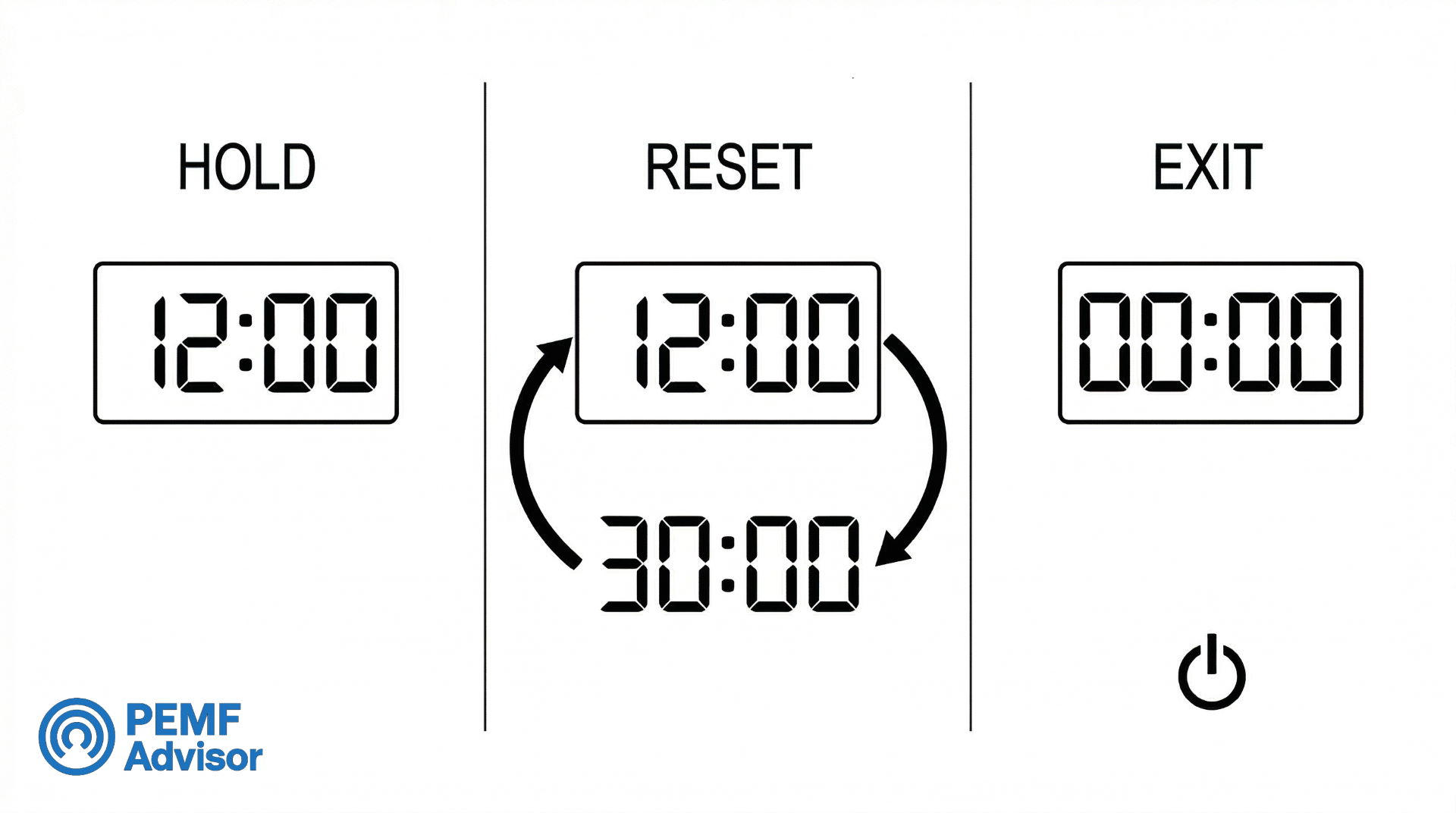
When a session is paused, three outcomes are possible depending on the device. Some controllers hold the remaining time and resume exactly where the countdown left off. Others reset the timer to the original duration, effectively restarting the session. A third category may exit the session state entirely, requiring the user to set up and start again from scratch.
This variance is a product design choice, not a performance characteristic. A device that holds remaining time on pause is more convenient for users who expect interruptions. A device that resets may frustrate users who need to step away briefly. Neither behavior changes what the device outputs while it is running.
Some sources describe pause/resume logic in terms of “therapeutic momentum”—the idea that pausing disrupts a beneficial process. This framing is not supported by the scope of this page. Pause behavior is an interface and workflow feature. Its effect on the electromagnetic field’s interaction with the body is not established by the controller’s timer logic.
| Pause Behavior Variance
Hold: Remaining time is preserved. Session resumes where it paused. Reset: Timer returns to the original duration. Session starts over. Exit: Session ends. User must set up and start a new session. |
Why Pause Logic Matters More Than Buyers Often Expect
Pause behavior becomes important the moment a session is interrupted by normal ownership realities: getting up, taking a call, losing app connection, or accidentally touching the interface. A controller that clearly preserves remaining time is easier to understand than one that silently resets or exits the session state.
This is not an efficacy issue. It is a predictability issue. Buyers comparing controllers should treat pause logic as part of interface transparency, not as a secondary convenience detail.
Auto-Shutoff, Lock State, and Accidental-Press Protection
Auto-shutoff means the device stops operating when the countdown timer reaches zero. This is a standard hardware behavior tied to timed operation. It supports ownership convenience—you can start a session before sleep or while resting and know that the device will turn itself off without your intervention.
Auto-shutoff is not a medical safety feature. It does not monitor your body, detect problems, or prevent harm. It is a session-end mechanism that responds to the timer, not to any health-related signal.
Lock-state functionality is a separate protection layer. When enabled, a control lock prevents accidental button presses from changing settings during an active session. If you bump the controller or a pet steps on it, the locked state prevents the session from being unintentionally altered. Not all controllers include this feature, and implementation varies—some use a dedicated lock button, others require a press-and-hold sequence to unlock.
Both features—auto-shutoff and control lock—are ownership and usability tools. They make the device more practical to live with. They do not validate the session’s parameters or guarantee safe operation.
App-Connected Control vs On-Device Control
Some PEMF devices route part or all of their control through a companion smartphone app. This can offer a larger display, expanded timer settings, session logging, and remote start/stop capability. For users who are comfortable with app-based interfaces, this can feel more modern and flexible than a small handheld controller.
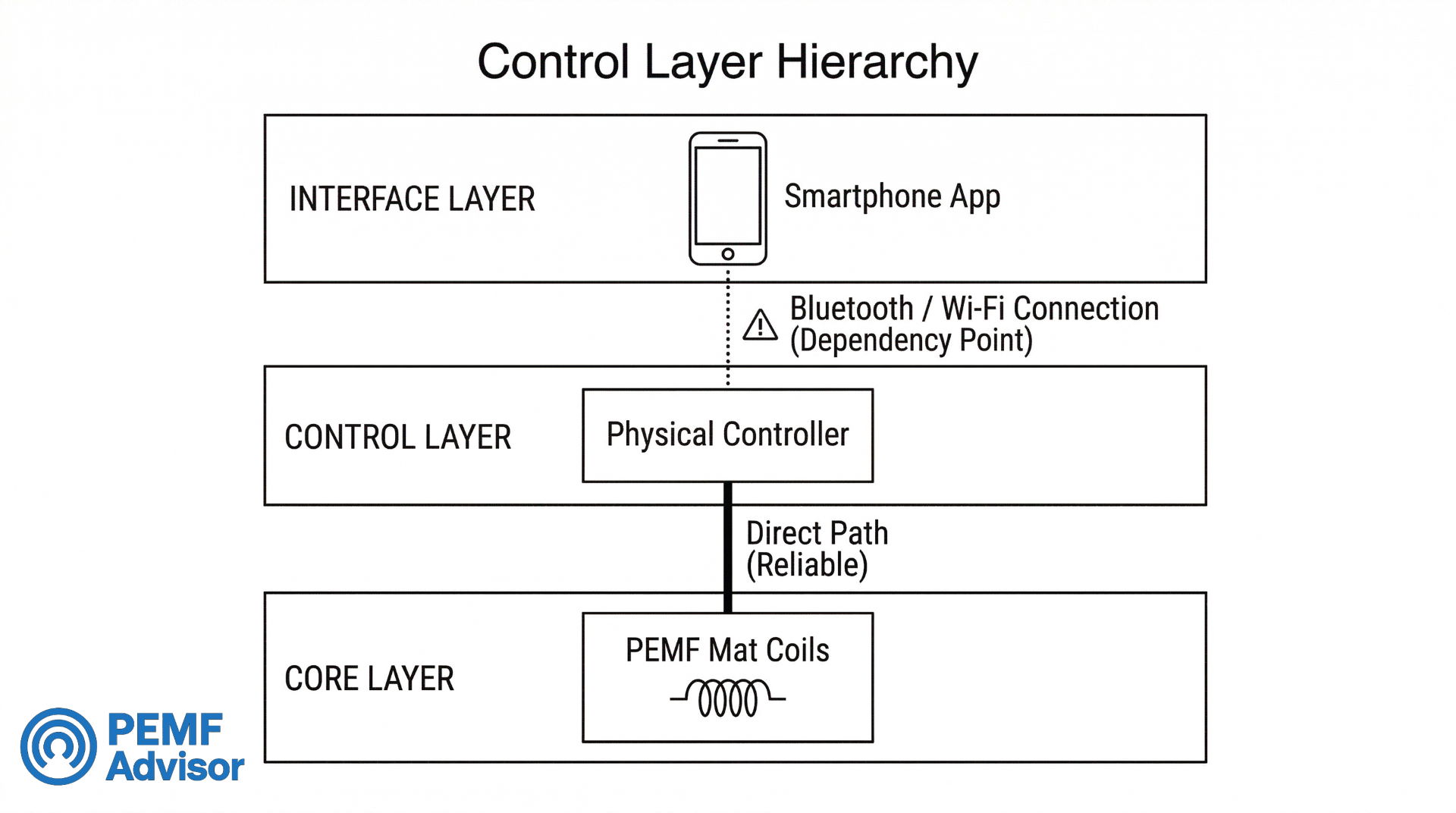
The trade-off is dependency. App-connected control requires a working Bluetooth or Wi-Fi connection between the phone and the device. If pairing fails, the phone battery dies, or the app encounters a software issue, the user may lose the ability to adjust settings or even start a session—depending on whether the device retains any on-device controls as a fallback.
This is the core tension: app control can expand what you can do with the interface, but it can also restrict what you can do without the phone. Devices that offer both app-based and on-device controls give the buyer a fallback. Devices that are entirely app-dependent make the phone a required accessory for operation.
Neither control method changes the device’s electromagnetic output. App control is an interface layer. It affects how you interact with timing and settings. It does not change what the mat or device produces during a session.
| Control Method | Trade-Off Summary |
| App-connected | Larger display, expanded settings, session logging; requires pairing and connectivity; phone becomes a required accessory on some devices |
| On-device only | Independent operation, no connectivity dependency; may have a smaller display and fewer adjustable settings |
What Buyers Should Verify Before Trusting App-Based Session Control
An app-based controller should be evaluated by what it still allows when the phone connection is unstable, interrupted, or unavailable. A polished app can improve visibility and convenience, but it can also hide basic workflow uncertainty if the buyer cannot tell whether the timer continues independently, pauses automatically, or resets after the connection drops.
The strongest app-based systems keep timer behavior legible and preserve some level of fallback control. The weakest app-based systems make basic session management dependent on software states the buyer cannot fully inspect before purchase.
Interface Transparency and Field-State Visibility
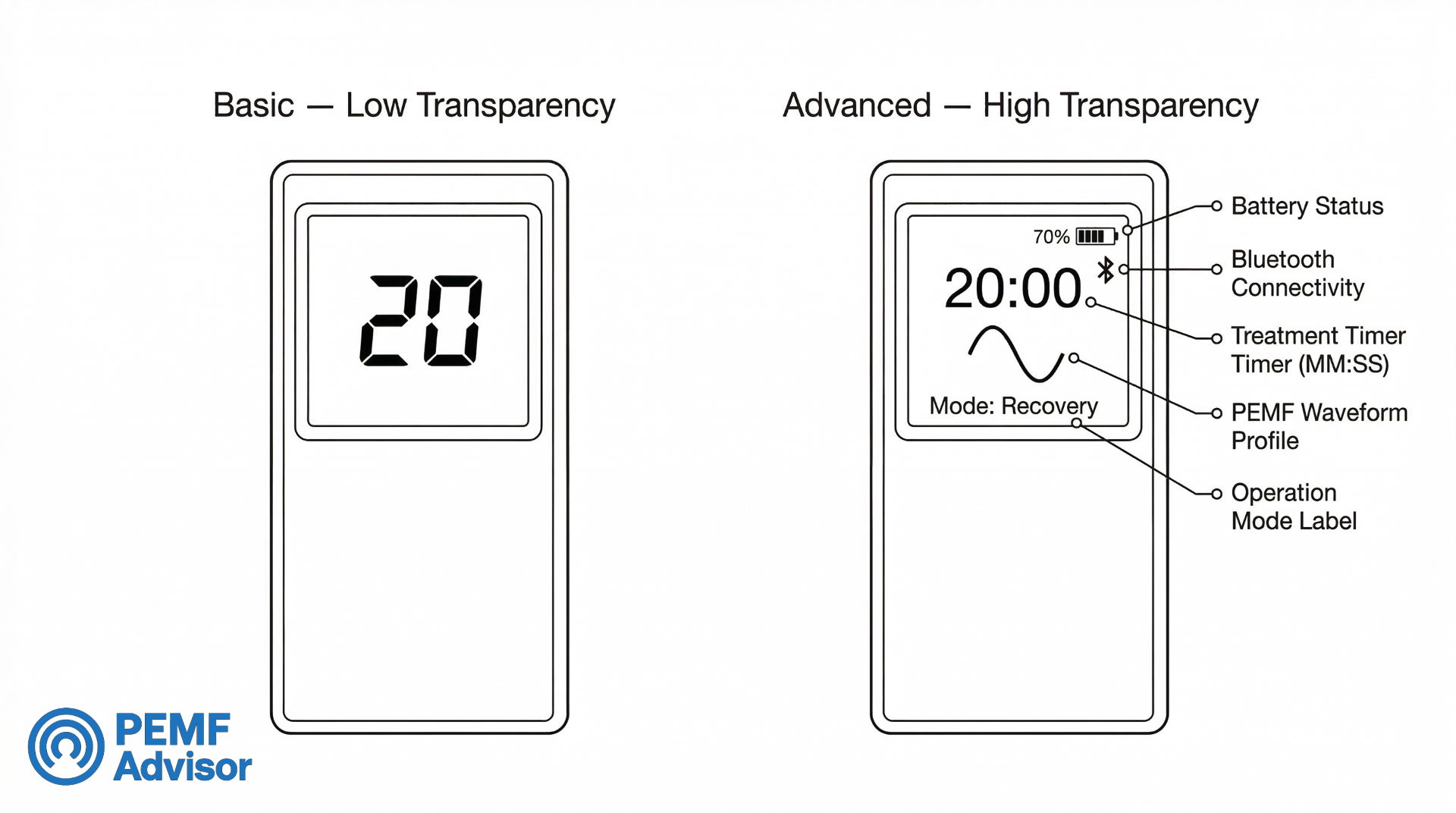
Interface transparency refers to how much operational information the controller reveals during a session. At one end of the spectrum, a controller shows only a countdown clock. At the other end, a controller shows remaining time, active operating mode, field-status confirmation, prompt states, and session history.
A clock-only interface tells you how much time is left. It does not confirm that the device is actively producing an electromagnetic field, what mode it is operating in, or whether the session is paused or running. For many users, the countdown alone is sufficient. For users who want visual confirmation that the device is doing something, a clock-only display can feel opaque.
A status-visible interface adds layers of feedback. An active-status indicator (a light, icon, or label) confirms the session is running. A mode display tells you which operating profile is selected. Prompt states show whether the controller is waiting for input, running, or complete.
More transparency makes the device easier to monitor and understand during use. It does not make the device more effective. A device with a plain LED countdown and a device with a full LCD dashboard can produce identical electromagnetic fields. The difference is in what the user knows about the session while it is happening—not in what the session does.
Interface Richness Is Not the Same as Interface Clarity
A richer display does not always create a clearer ownership experience. Some controllers show more icons, prompts, and visual layers without making session state easier to interpret. By contrast, a simpler interface can be more transparent when the countdown, active status, and confirmation logic are obvious at a glance.
For comparison purposes, the strongest interface is the one that reduces ambiguity during use. Buyers should judge displays by how clearly they communicate state changes, not by how many visual elements they contain.
What Timer Settings and Displays Do Not Tell You
This section sets hard interpretation boundaries. Session controls are useful features, but they carry specific limitations that buyers should understand before drawing conclusions from timer numbers or display information.
Time Is Not Intensity
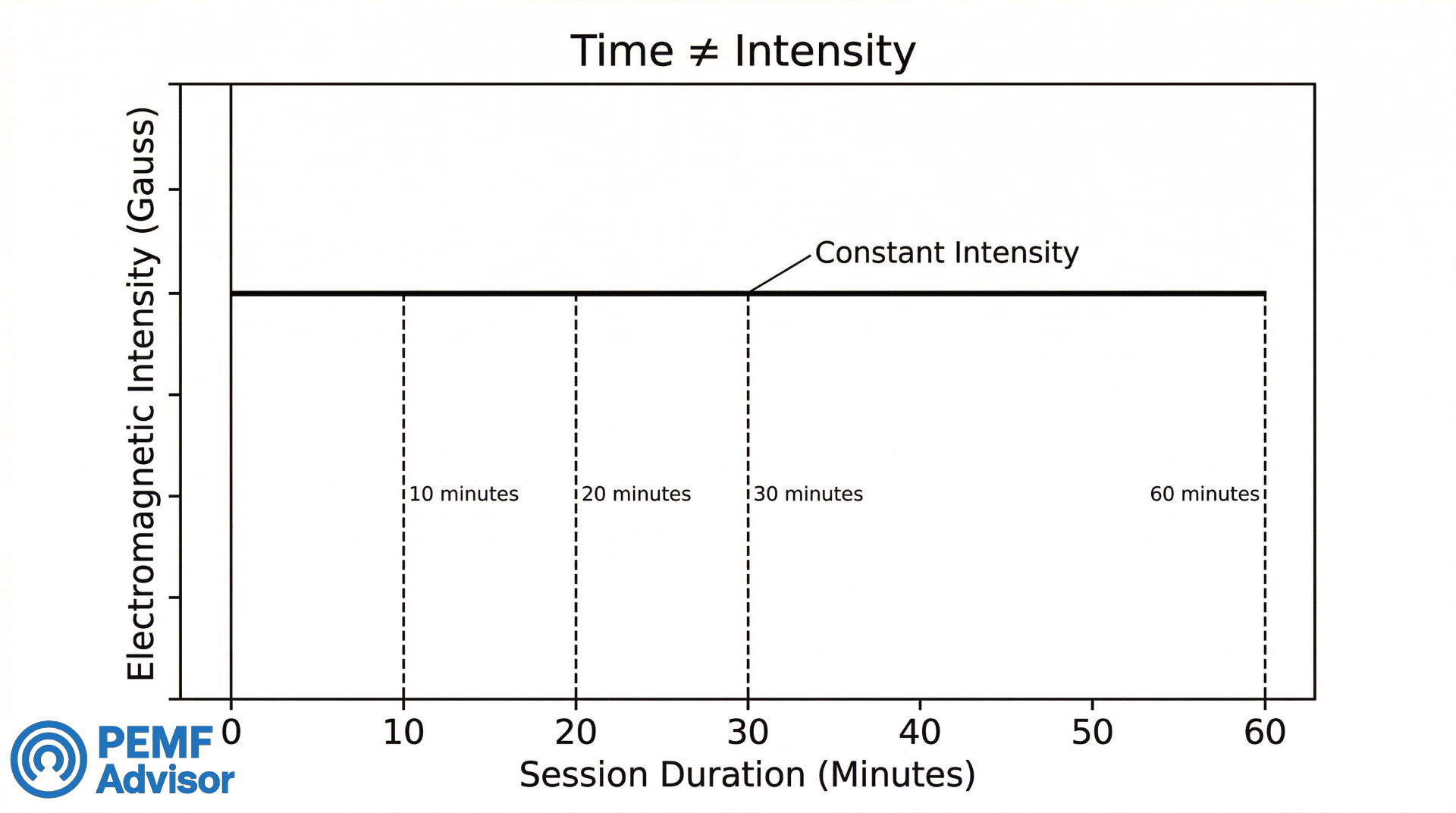
A timer setting controls how long a session runs. It does not control or indicate how strong the electromagnetic field is during that session. A 60-minute session is not inherently more intense than a 20-minute session. Intensity (measured in Gauss or Tesla) is a separate device specification determined by the hardware’s design, not by the countdown clock.
This distinction matters because some product comparisons imply that a device with a longer available timer range is “more powerful.” Timer range is a time specification. Power output is a field specification. They describe different things.
| ⚠ Boundary
A longer timer setting means a longer session. It does not mean a stronger electromagnetic field. |
Time Is Not Efficacy
Timer duration does not establish whether a session produces a health benefit. A countdown display showing 30 minutes remaining does not confirm that the session is “working” or that 30 minutes is the duration needed for a particular outcome.
Some PEMF marketing materials make claims like “8-minute sessions for cellular recharge” or “30 minutes for deep rest.” These attach outcome language to time settings. Under the constraints of this page, such claims are not supported—session length is a product specification, not evidence of biological effect.
The practical takeaway: when comparing devices, treat listed session durations as what-the-device-allows information, not as what-the-device-achieves information.
Display Detail Is Not Proof of Safety or Performance
A controller with a detailed LCD screen showing mode, time, status, and field indicators is more informative during use than a controller with a single blinking LED. But the additional information displayed does not mean the device is safer or that its sessions are more effective.
Display richness affects visibility—how much you can see about the current session state. It does not affect validity—whether the session is producing a meaningful result. A simple display on a well-engineered device and a rich display on a poorly engineered device will look different to the user but that appearance carries no inherent performance information.
Auto-shutoff, similarly, is a session-end feature. It tells you the device will stop running when time expires. It does not tell you the device monitored your safety during the session.
A Disclosure Scorecard for Session Controls
| Disclosure Level | What the Interface Reveals | Comparison Confidence |
| High | Selected session length, visible countdown, active/paused/stopped state, and clear end-of-session behavior | Strong — buyers can compare workflow behavior directly |
| Moderate | Session length and countdown are visible, but state changes or pause logic remain partly unclear | Mixed — useful comparison is possible, but only partially |
| Low | Timer exists, but visibility is limited to broad blocks, sparse indicators, or vague prompts | Weak — the controller is harder to compare during ownership |
| Opaque | Session behavior depends on hidden logic or poorly explained app behavior | Minimal — the workflow is difficult to verify before purchase |
This scorecard does not rank products. It ranks workflow disclosure. A lower disclosure level does not prove a device is poor. It shows that the buyer has less reliable information about how the session interface actually behaves.
More Control Inputs Do Not Create More Output
A controller with finer timer increments, more buttons, or more screen states may feel more advanced, but those interface layers do not alter what the hardware outputs during the session. They change workflow precision and ownership experience. They do not change intensity, waveform, or field behavior on their own.
This matters because product pages often let interface complexity imply performance depth. Buyers should separate “more ways to manage the session” from “more evidence about what the session does.” They are not the same claim.
Precision vs Convenience: 1-Minute Steps vs Broader Blocks
Some controllers let you set session time in 1-minute increments. Others use broader blocks—5, 10, 15, or 30 minutes per step. This is a usability distinction, not a performance one.
One-minute steps give more control over exact session length, which some users prefer. Broader blocks make the interface simpler and faster to navigate, which other users prefer. The best fit depends on how much time-setting precision matters to you personally—not on any relationship between increment size and session results.
Claims that precise increments allow “better tuning” of sessions for specific outcomes are not supported within the scope of this page. Timer granularity is an interface design feature. It changes how you set time. It does not change what happens during the session.
Limits, Ranges, and Defaults as Spec-Sheet Facts Only
Every PEMF device with a timer has a minimum and maximum session duration, and most have a default starting value. These numbers are product specifications. They tell you what the device allows, not what it recommends.
A device with a 1–90 minute range allows more time-setting flexibility than a device with a fixed 30-minute session. That is a factual specification comparison. It does not indicate that the wider-range device is better, stronger, or more suited to a particular use case.
Default durations—the time that appears when you first turn on the device—are set by the manufacturer. They reflect a design decision about what the device should do out of the box. They are not prescriptions, recommendations, or evidence-based starting points. Treat them as factory settings, nothing more.
| Spec-Sheet Framing
Minimum duration: the shortest session the device allows. Maximum duration: the longest session the device allows. Default duration: the starting value when powered on. A factory setting, not a recommendation. All three are product specifications. None indicate what duration is appropriate for any health goal. |
Minimum Session-Control Disclosure Threshold Before Comparison Becomes Reliable
A session-control system becomes meaningfully useful for comparison when the buyer can identify at least three things: how session length is selected, how the countdown is shown during use, and how the controller behaves when the session is paused, completed, or interrupted. A fourth layer—whether the device retains fallback control when app features fail—improves the comparison further but is not required to establish basic transparency.
This is not a product verdict. It is a workflow-disclosure rule. The less the controller reveals about how a session actually starts, progresses, pauses, and ends, the more the buyer is being asked to trust the interface rather than understand it.
FAQ
What is the difference between a mechanical dial and a digital keypad for session timing?
A mechanical dial is an analog-style rotary control that sets approximate session time based on where you turn it. A digital keypad lets you enter or step through a precise number using buttons or a screen. Digital timers are typically more accurate for setting exact durations, while mechanical dials are simpler but less precise. The difference is in how you set time, not in what the timer means for any health outcome.
Do fixed timers make a PEMF device easier to use?
They can, in the sense that fixed timers require fewer input steps—you press start and the device runs its preset duration. This simplifies the routine for users who do not need flexibility. However, ease of use also depends on display clarity, button layout, and overall interface design. A fixed timer on a confusing interface is not necessarily easier than an adjustable timer on a clear one. Simpler timing does not imply better outcomes.
What does an adjustable timer actually change for the buyer?
It changes the range of session lengths available. Instead of one fixed duration, you can choose from a range—often with defined step increments. This gives you flexibility to match session time to your schedule or preference. It does not change the device’s electromagnetic output or indicate anything about field strength or efficacy.
Does a countdown display show anything beyond remaining time?
On basic controllers, no—the display shows only remaining minutes and seconds. On more advanced controllers or app interfaces, the countdown may appear alongside additional information like operating mode, active-status confirmation, or prompt states. Whether the display shows more than a clock depends on the controller’s design, not on the device’s output capabilities.
Are LCD screens more informative than simple LED indicators?
Generally, yes. LCD screens can display text, numbers, icons, and multiple data fields simultaneously, which gives the user more information about the current session state. A simple LED indicator may show only that the device is powered on or that a session is active, with no detail about mode or time. More information supports better usability and transparency, but it does not prove the device is safer or more effective.
Does pause/resume keep the remaining time or restart the session?
This varies by device. Some controllers hold the remaining time and resume from where the session was paused. Others reset the timer to the original duration. Some may exit the session state entirely, requiring a fresh start. Check the specific device’s documentation or manual, as pause behavior is a product design choice that differs across brands and models. It is a usability distinction, not a treatment one.
What does auto-shutoff do on a PEMF device?
Auto-shutoff stops the device automatically when the session timer reaches zero. It means you do not need to manually turn off the device after each session. This supports convenience—especially during sessions where you may fall asleep or step away—and can help conserve battery on portable devices. It is a hardware-level timing feature tied to the countdown clock.
Is auto-shutoff the same as a medical safety feature?
No. Auto-shutoff is a session-end mechanism that responds to the timer. It does not monitor your body, detect adverse reactions, or prevent harm. It should be understood as a hardware/session-end behavior—the device stops because the countdown finished, not because it evaluated your safety during use.
Why do some PEMF devices require app control for timer changes?
Some manufacturers design their devices with a simplified on-device interface and move expanded settings—including timer adjustments, mode selection, and session logging—to a companion app. This can keep the physical device smaller and less expensive to produce. The trade-off is that timer changes become dependent on a working phone connection, which introduces pairing and connectivity requirements.
Is app-based timer control more convenient or more restrictive?
It can be either, depending on the setup. App control may offer a larger display, more adjustable settings, and session tracking—which some users find more convenient. However, it also introduces dependency on Bluetooth or Wi-Fi connectivity, phone battery life, and app software stability. If pairing fails or the app is unavailable, the user may lose access to timer settings. Whether it feels more convenient or more restrictive depends on your comfort with app-based interfaces and the reliability of the connection.
What is a control lock state on a PEMF controller?
A control lock state is a feature that prevents or reduces accidental input changes during an active session. When the lock is engaged, pressing buttons on the controller does not change the timer, mode, or other settings. This protects against unintended interruptions—for example, if the controller is bumped or a button is pressed accidentally. Implementation varies: some controllers use a dedicated lock button, while others require a specific sequence to unlock. It is an ownership and usability feature.
Why do confirmation prompts or audible alerts matter?
Confirmation prompts help prevent accidental session starts by requiring a deliberate second action before the device begins operating. Audible alerts signal state changes—session started, session paused, session complete—which is useful when you are not looking at the display, such as during rest. Together, these features improve clarity about what the controller is doing at any given moment. They affect usability and accessibility, not the efficacy of the session.
Are digital timers more accurate than analog dials?
Typically, yes. Digital timers set and track time using electronic circuits that count precise intervals. Analog dials rely on physical position, which is inherently less exact—especially on small dials with few markings. For buyers who want consistent, repeatable session lengths, digital timers provide more reliable precision. That said, timing precision is a usability attribute. It does not indicate that a digitally timed session produces better results than an analog-timed one.
Do small timer increments matter for usability?
They can. One-minute increments let you set session time more precisely, which matters if you have a specific time window or personal preference for exact durations. Broader increments (5–10 minutes per step) simplify the interface and are faster to navigate. The trade-off is between precision and simplicity. Neither increment style is a proof-of-results variable—it is an interface design choice.
Can a timer setting tell you how strong the session is?
No. A timer setting controls session duration. Field strength—measured in Gauss or Tesla—is a separate hardware specification. Setting a longer time does not increase the electromagnetic field’s intensity. Session length and output strength are different attributes of the device.
Does a longer timer mean a stronger or better session?
No. A longer timer means a longer session, nothing more. It does not increase the electromagnetic field’s strength, frequency, or coverage. It does not establish that more time produces a better outcome. This page does not recommend longer or shorter sessions for any goal or condition.
What should buyers look for in interface transparency?
Look at whether the controller shows only remaining time or also confirms operating status, active mode, and session state (ready, active, paused, complete). A more transparent interface gives you clearer feedback about what the device is doing at any moment, which can reduce confusion and increase confidence during use. This does not mean a transparent interface makes the device more effective—it makes it easier to operate and monitor.
What happens if a controller shows only a clock and not operating status?
A clock-only display confirms that time is counting down, but it does not confirm broader operating status. You may not know from the display alone whether the device is actively producing a field, what mode is selected, or whether the session is paused versus running. If this matters to you, look for controllers that include a separate active-status indicator or prompt state alongside the countdown, or that use an app interface with richer session feedback.

The PEMF Advisor Editorial Team reviews consumer PEMF mats and related wellness devices. Our work focuses on verified specifications, documentation, usability, materials, warranty/returns, and ownership considerations. We do not provide medical advice or evaluate health outcomes. See our Review Methodology and Editorial Standards.