PEMF controller settings describe how a home-use device lets you view or change operating variables such as frequency, intensity, timing, and program selection – when those values are actually disclosed. Preset modes hide some or all of those values behind labeled software routines, while manual controls expose more of the underlying settings. The key buying issue is how visible, adjustable, and comparable the controller behavior is before purchase.
If you are comparing PEMF mats or devices, the controller is where nearly every purchasing confusion starts. Marketing pages list mode names, program counts, and interface screenshots, but they rarely explain what those controls actually let you see or change. This article breaks down controller architectures, parameter visibility, and the trade-offs between simplicity and transparency so you can evaluate disclosure quality rather than marketing language.
PEMF Advisor publishes buyer-oriented reviews, comparisons, and educational content for home-use PEMF mats and devices. This page is a constrained controller-literacy explainer within that system: it focuses only on how buyers should interpret controller settings, presets, and manual controls on product pages, not on treatment guidance, diagnosis, or condition-based controller recommendations.
If you want the broader spec context around frequency, intensity, waveform, and parameter disclosure, use our PEMF Specs and Controller Explained guide. This page supports that larger comparison framework by isolating one layer of the buying process – the controller – and showing what its interface does and does not let a buyer verify.
PEMF Controller Types Compared
PEMF controllers differ by their control logic. The five main architectures are fixed-mode, preset-program, manual-control, hybrid, and app-dependent designs. Each architecture changes three things for the buyer: what you can see on the interface, what you can change during a session, and what remains hidden behind software labels.
Comparison quality between devices is constrained by parameter visibility. When frequency and intensity values are not disclosed, comparing two controllers becomes a comparison of marketing labels rather than operating specifications. Presets are constrained by software-defined sequences rather than giving the user direct parameter access. Manual frequency control enables direct frequency targeting, but that capability is constrained by the user’s own knowledge of PEMF parameters.
The practical distinction: manual controls allow specific frequency targeting while presets abstract values behind software labels. There are genuine use-case trade-offs between fixed-cycle simplicity and manual adjustment complexity. And a real contradiction exists in the market: some brands disclose their preset sequences openly while others use black-box proprietary modes, which makes side-by-side comparison uneven from the start.
| How to Read This Comparison
The table below compares controller architectures by what the buyer can actually verify – not by which design is better. Focus on disclosure quality and visibility, not feature counts or mode names. |
Buyer Transparency Checklist for Any PEMF Controller
Before trusting what a controller appears to offer, check four things in order: does the interface show actual operating values, does it let you change them directly, does it reveal what each preset contains, and can those settings be verified during use rather than only in marketing copy. If those layers are missing, the controller may still be usable, but the comparison quality drops.
This is the practical point of controller literacy. A controller does not become more transparent because it lists more modes, uses a touchscreen, or looks more advanced in screenshots. It becomes more transparent when the buyer can tell what is visible, what is adjustable, and what remains hidden behind software labels.
Controller Architecture vs. Buyer-Visible Disclosure
This table is the primary compression artifact for the page. Use it to distinguish architectures at a glance. A labeled mode is not the same as a disclosed parameter. The number of modes a controller offers tells you less than the specification quality of the information it actually shows.
| Controller Architecture | What the Buyer Sees | Parameter Transparency | Customization Level |
| Fixed-mode | One operating cycle, often with on/off and timer only | Low – frequency and intensity typically undisclosed | None or minimal (timer only) |
| Preset-program | Named modes (e.g., Relax, Energy, Sleep) selectable from a menu | Varies – some brands show Hz/Gauss per mode, others show only names | Limited to switching between preloaded programs |
| Manual-control | Direct frequency, intensity, and/or timer inputs | High – values displayed and adjustable on screen | Moderate to high; depends on saveable sequence support |
| Hybrid (preset + manual) | Preset menu plus some manual overrides or fine-tuning | Mixed – some parameters visible, others still hidden in presets | Varies by which parameters are exposed for manual edit |
| App-dependent | Smartphone app as primary or sole interface | Varies – depends on what the app actually displays | Can be high if app exposes full settings; limited if app is a preset launcher |
| Key Distinction
Display fidelity – how accurately the interface shows what the device is doing – is a more useful buying criterion than the number of modes a controller lists. A device with three fully disclosed presets gives you more comparison data than one with twenty opaque mode names. |
Fixed-Mode Controllers
Fixed-mode mats do not allow user-defined frequency changes. The control logic offers simplicity – typically just an on/off switch and sometimes a timer – but low adjustment depth. Because fewer parameters are exposed to the user, fixed systems often reduce transparency as a side effect of their simplified design.
A fixed-mode controller may suit buyers who want minimal interaction with the device. That is a fit statement about user preference, not a performance claim. The trade-off is straightforward: fixed-cycle simplicity comes with disclosure limits, because the buyer cannot verify what frequency or intensity the device is actually delivering.
Preset-Program Controllers
Preset modes are software-defined sequences of frequencies and intensities bundled under a label. The buyer selects a named program – such as Recovery, Sleep, or Energy – and the device runs a predefined routine.
Presets vary significantly in disclosure quality. Some controllers show the frequency, intensity, and duration for each step inside a preset. Others display only the mode name with no underlying numbers. When a preset is opaque, the buyer cannot verify what the device is actually doing from the interface alone.
Lifestyle preset names are low-trust comparison data when they are not accompanied by parameter disclosure. Two devices may both offer a “Sleep” mode, but without disclosed sequences, there is no way to compare what those modes actually do. Some sources suggest named modes affect health-related outcomes, but such claims are difficult to verify and fall outside the scope of what controller-setting literacy can confirm.
| Visible Preset vs. Black-Box Preset
Visible preset: Interface shows “Sleep – 3 Hz, 20 µT, 30 min, ramping sequence.” The buyer can evaluate and compare. Black-box preset: Interface shows “Sleep Mode.” The buyer cannot verify what the device is doing or compare it to another brand’s sleep mode. |
Preset Count Is Not the Same as Preset Quality
A long preset list can make a controller look more capable than it really is from a comparison standpoint. Twenty named programs still provide weak buying data if the interface does not disclose the frequency, intensity, timing, or sequence logic behind those labels. By contrast, a smaller number of presets with visible values gives the buyer a much stronger basis for cross-device comparison.
This is why preset quantity should be treated as a secondary interface trait rather than a primary buying signal. The stronger question is not “How many presets are there?” It is “How much does the controller actually show me about what those presets do?”
Manual-Control Controllers
Manual controllers expose more direct settings than fixed or opaque preset systems. Frequency, intensity, and sometimes timer and waveform options are accessible for the user to set individually. This enables specific frequency targeting – the buyer can dial in an exact Hz value rather than trusting a software label.
The trade-off is that manual control requires greater user knowledge of PEMF parameters. A buyer who does not understand what frequency or intensity values to select may find the interface overwhelming rather than empowering. Manual control should be framed as a transparency-versus-simplicity trade-off, not a universal superiority claim. Some sources argue that manual control is inherently superior for results, but that framing conflates interface design with therapeutic evidence, which this article does not treat as interchangeable.
Buyers should also note that partial manual control exists. Not every device labeled as “manual” exposes the same settings. One device might let you set frequency but not intensity. Another might expose both but not allow you to save custom sequences. Assess which settings are actually adjustable before assuming full manual access.
A Simple Fit Check for Manual Control
Manual control tends to fit buyers who want to see exact values and make direct adjustments during comparison or use. That is a transparency and workflow preference, not proof that manual systems are inherently better devices. A manual controller becomes useful when the buyer values parameter visibility enough to make use of it.
For a buyer who wants the shortest path from setup to session, a simpler controller may be a better fit even if it exposes fewer settings. For a buyer who wants to inspect frequency or intensity directly, a more visible interface may be the better fit even if it requires more learning. The fit issue is not results. It is complexity versus visibility.
Hybrid Controllers with Presets Plus Manual Adjustment
Many products sit between fully preset and fully manual designs. Hybrid controllers combine ready-made modes with some degree of manual adjustment. A device might offer ten preset programs and also let the user manually set frequency within a range or adjust session duration beyond preset defaults.
Hybrid systems vary by which settings are exposed and whether custom sequences can be saved. A controller described as hybrid can still include hidden logic if only some parameters are visible – for example, manual frequency control paired with undisclosed intensity values.
The customization depth ladder matters here. At the bottom, a hybrid might only let you adjust the timer on top of a locked preset. In the middle, it might expose frequency and intensity for tweaking. At the top, it might let you build, save, and recall entirely new multi-step sequences. Do not assume all hybrid systems offer the same level of adjustment.
App-Based and App-Dependent Controllers
User interfaces on PEMF devices can include physical buttons, dials, touchscreens, or smartphone apps – and increasingly, app control is the primary or sole interface. App-based systems can offer convenience: software updates, graphical displays, session logging, and remote operation.
The contradiction is that smartphone control can be framed as either a feature or a limitation. On the convenience side, apps can provide richer interfaces than small hardware screens. On the dependency side, an app-only device becomes unusable if the app is discontinued, the phone operating system changes, or the Bluetooth connection fails.
The stable issue for buyers is dependence and obsolescence risk. A device that requires an app to function at all is a device whose usability is tied to a software ecosystem the buyer does not control. This is not a fear-based argument – it is an ownership consideration that applies to any connected hardware.
| App Control Factor | Potential Advantage | Potential Limitation |
| Interface richness | Larger display, graphical presets, session history | Requires charged phone and active Bluetooth connection |
| Software updates | New modes or features can be added post-purchase | Updates may change behavior or remove existing features |
| Long-term usability | Manufacturer can improve the device remotely | App discontinuation renders the controller nonfunctional |
| Parameter visibility | App may show detailed Hz/intensity data | App may also hide values behind the same opaque presets |
What Buyers Should Verify Before Trusting an App-Based Controller
An app-based controller should be evaluated the same way as any other interface: by what it actually shows and what it actually lets the buyer change. A polished screen, session history, or modern design language does not improve transparency on its own if the underlying operating values remain hidden behind mode names.
The most useful app-based systems clearly show the active parameters, preserve access to them during use, and do not require the buyer to trust software labels alone. The weakest app-based systems add convenience at the surface while keeping the core operating logic just as opaque as a basic preset controller.
What PEMF Controller Settings, Presets, and Manual Controls Mean
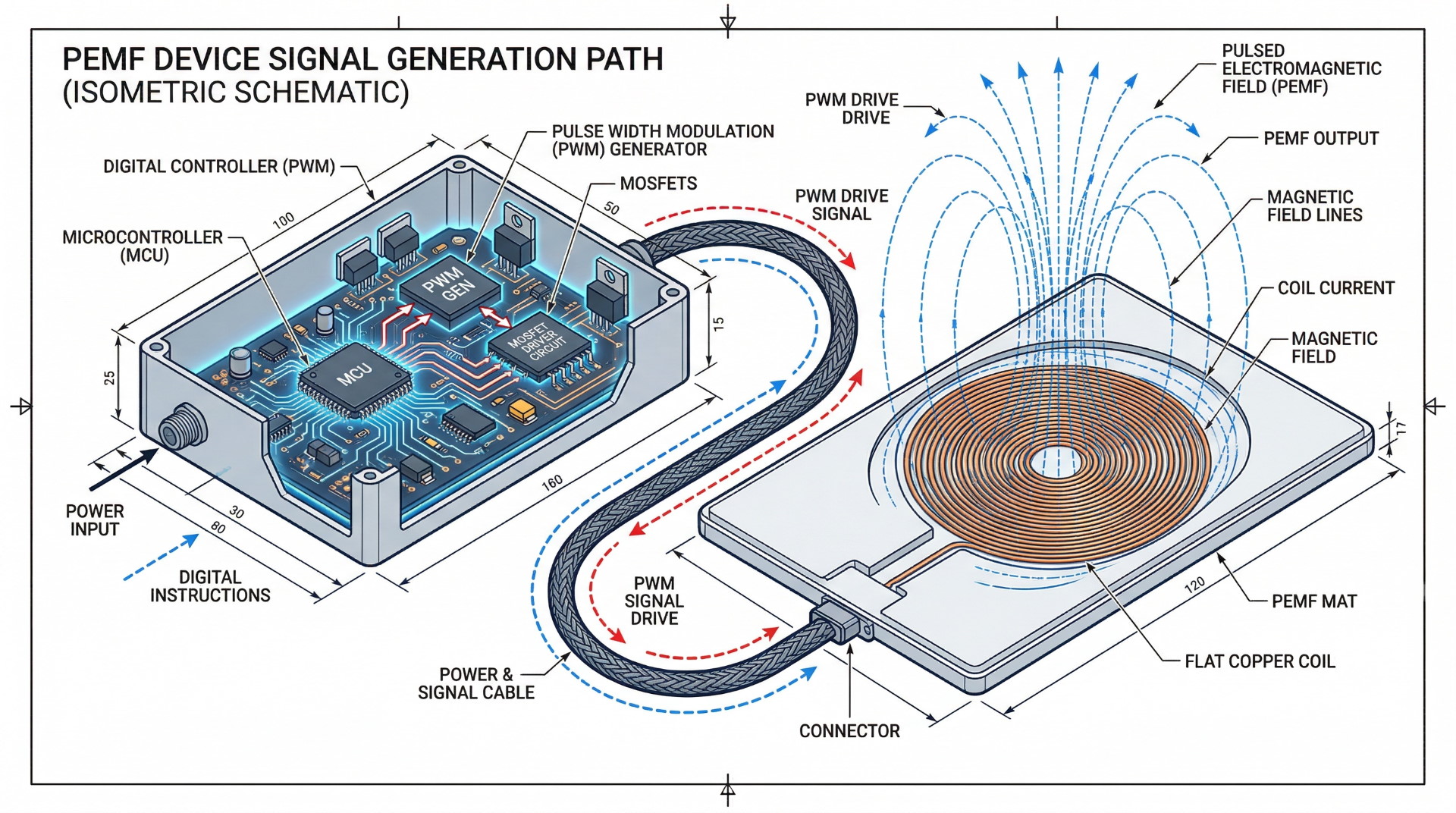
The controller is the signal generator for the PEMF coils. It determines what electromagnetic pulses are produced, at what frequency, at what intensity, and for how long. Every setting you interact with on a PEMF device is filtered through the controller’s logic.
Controller settings describe how the device operates, not what outcome it guarantees. The distinction matters because marketing language often blurs the line between “this mode runs at 10 Hz” (an operational fact) and “this mode promotes recovery” (an outcome claim the interface cannot prove). Control-system literacy – understanding what the interface actually shows versus what marketing asserts – matters more than label names when comparing devices.
What the Controller Does in a Home-Use PEMF Device
The controller is the command layer between you and the coils. It determines how values are selected, displayed, limited, or hidden. When you press a button, choose a preset, or set a frequency on a manual controller, you are instructing the controller to drive the coils in a specific pattern.
This is an instrument and interface issue, not a therapy-authority issue. The controller can tell you what signal it is sending – if it is designed to do so. It cannot tell you what that signal does inside your body. Recognizing this boundary helps buyers focus on verifiable operating data rather than unverifiable outcome promises.
The Difference Between Fixed Settings, Presets, and Manual Controls
Think of it like a car radio analogy. A fixed-mode controller is a radio locked to one station – you can turn it on or off, but you cannot change what it plays. A preset-program controller gives you station presets – you can switch between them, but you cannot tune to a frequency not on the list. A manual controller gives you the full tuning dial – you pick any station you want, but you need to know what you are looking for.
Fixed settings limit user adjustment. Presets package settings into named programs. Manual controls expose more direct adjustment options. The key difference across all three is how much control and visibility the user gets – from none (fixed) to partial (preset) to direct (manual).
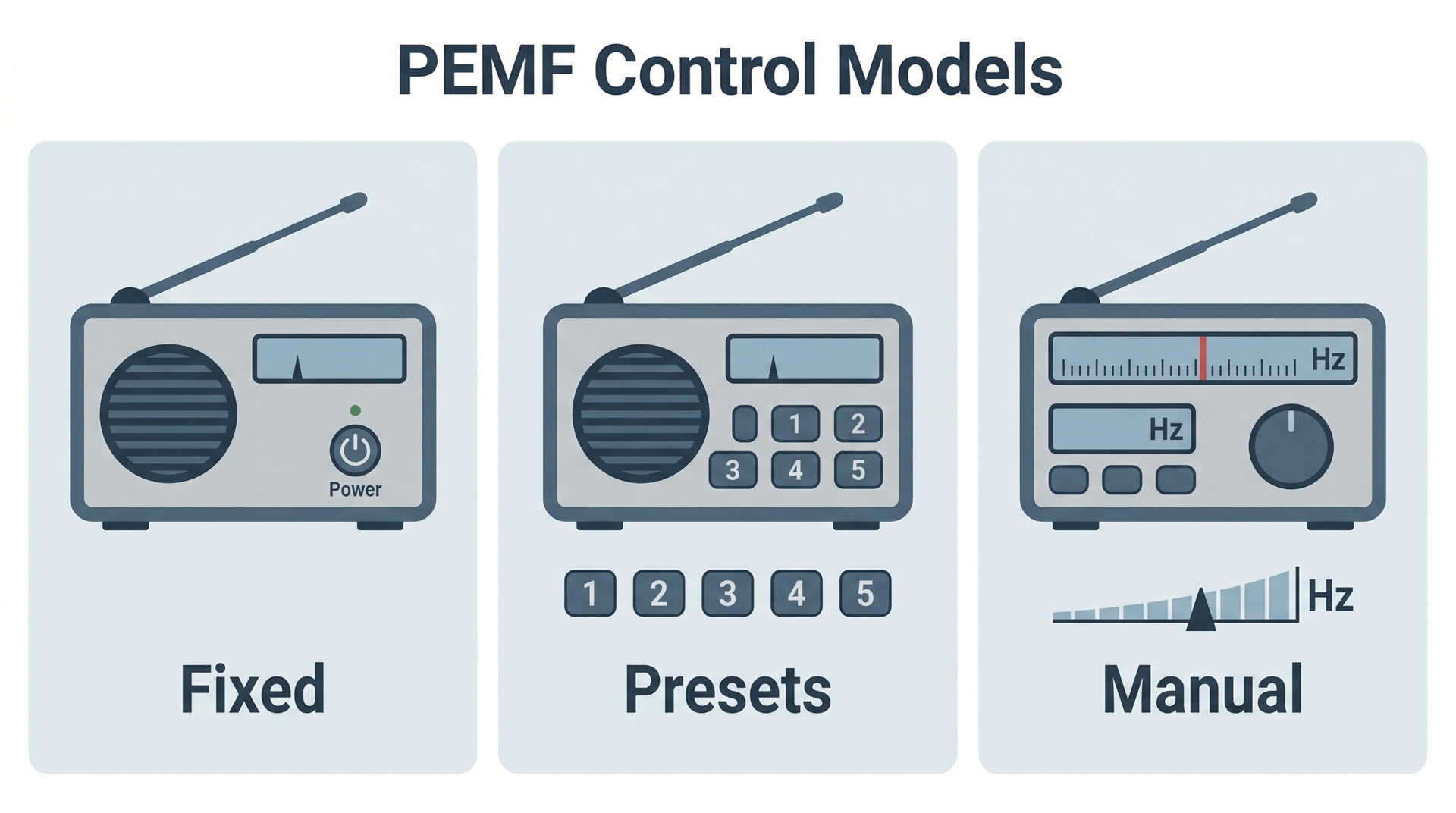
| Control Model | User Sees | User Changes | Signal Abstraction Level |
| Fixed | On/Off, possibly a timer | Nothing or timer only | Fully abstracted – no parameter access |
| Preset | Named modes or numbered programs | Which preset runs | Partially abstracted – values may or may not be disclosed |
| Manual | Numeric frequency, intensity, timer fields | Individual parameter values | Minimal abstraction – direct numeric input |
Why Controller Literacy Matters More Than Mode Names
Lifestyle labels – Sleep, Relax, Healing, Energy, Recovery – are weak comparison inputs when the underlying values are hidden. If one brand’s “Relax” mode runs at 3 Hz and another’s runs at 8 Hz, the label is identical but the operating behavior is not. Without disclosed values, you are comparing marketing language, not device behavior.
Visible settings and disclosed sequences are more useful than marketing names for cross-device comparison. Named modes cannot, by themselves, validate health-related claims. Some sources suggest named modes affect health outcomes, but those assertions should remain observational rather than treated as established fact within a buying guide.
| Label vs. Disclosed Value
“Relax Mode” tells you the marketing intent. “3 Hz, 15 µT, sine wave, 20 minutes” tells you the operating specification. Only the second version lets you compare devices on equal terms. |
How Controller Settings Work Behind the Interface
Behind whatever buttons or touchscreen you interact with, the controller manages four primary variables: frequency (how many pulses per second), intensity (how strong the magnetic field is per pulse), timing (how long a session runs and whether it changes over the session), and sequence logic (whether the device cycles through different parameter combinations in a programmed order).
Digital controllers may use pulse-width modulation (PWM) to simulate waveform behavior. These mechanics support buyer understanding of disclosure – what you are actually adjusting when you change a setting – rather than medical protocol selection.
Frequency Control and What Hz Means on a PEMF Controller
Hz (hertz) refers to the frequency value shown or controlled on some PEMF devices – specifically, the number of electromagnetic pulses the device generates per second. A setting of 10 Hz means the coils pulse ten times per second.
Frequency visibility varies by controller architecture. Fixed-mode devices typically do not show Hz at all. Preset controllers may or may not display the frequency each program uses. Manual controllers generally show the Hz value and let the user change it.
Manual frequency control enables direct targeting of specific values when exposed. Frequency display improves comparability – you can confirm what two devices actually do – but displaying a frequency is not, by itself, a treatment recommendation.
Intensity Control and What Buyers May See as Gauss or Microtesla
Buyers may encounter intensity disclosed as Gauss or microtesla (µT), depending on the manufacturer’s preferred unit. Both measure magnetic field strength. One Gauss equals 100 microtesla. Some devices show intensity numerically; others use relative scales (Low/Medium/High) that do not correspond to specific measurement values.
Intensity visibility varies by controller and interface. Disclosure of intensity in measurable units improves specification literacy – you know what the device claims to produce – but it does not prove superior results compared to a device that discloses less. The useful distinction is between controllers that show verifiable numbers and those that do not.
| Unit Quick Reference
1 Gauss = 100 microtesla (µT). Home-use PEMF devices typically operate in the low-Gauss range. If a spec sheet lists only one unit, you can convert to compare across brands. |
Timers, Session Duration, and Cycle Structure
Controller behavior also includes how long sessions run and whether duration can be adjusted. Timer flexibility varies by device: some offer only fixed durations (e.g., 20 or 30 minutes), while others allow minute-by-minute adjustments.
In preset-based systems, the timer may be locked to the preset’s built-in duration. In manual systems, the user may set any duration the hardware supports. Session structure – whether the device runs at constant parameters or cycles through changes during a session – is part of controller transparency, especially in presets where the internal timing sequence is often undisclosed.
Presets as Software-Defined Sequences
A preset is not a single setting – it is a bundled software-defined sequence. A typical preset might start at 5 Hz for five minutes, ramp to 10 Hz for ten minutes, then drop to 2 Hz for five minutes, all at varying intensity levels. The label “Relax” tells you none of this.
Some brands disclose the full sequence for each preset. Others keep sequences proprietary. The contradiction is real: two devices can both market transparency, but one shows the full parameter chain while the other hides everything behind a mode name. Preset opacity – the inability to verify what a preset actually does from the interface – is a structural disclosure problem, not a sign that the hidden preset is necessarily inferior.
Digital Control, PWM, and Simulated Waveform Behavior
Digital controllers use pulse-width modulation (PWM) to simulate waveform behavior. PWM rapidly switches the output on and off at controlled intervals to approximate different wave shapes – sine, square, sawtooth, or others – from a digital signal source.
PWM is a standard method in digital electronics for controlling power delivery. It is part of how digital PEMF controllers operate, not proof of proprietary superiority. Claims about “proprietary waveform purity” should be approached with skepticism when the underlying PWM parameters are not disclosed. If a manufacturer credits a unique waveform but does not show the specifications that define it, the claim functions more as marketing language than verifiable engineering data.
What Parameter Transparency Tells a Buyer
Visible parameters versus hidden preset logic changes how reliably devices can be compared. Parameter transparency improves comparison quality – it does not improve medical proof. If two devices both show frequency, intensity, and session duration, you can compare their specifications directly. If one device hides those values, comparison reverts to trusting label names.
Proprietary labeling can reduce verifiability. Customization only matters if buyers can see what is actually adjustable and savable. A controller advertised as “highly customizable” that only lets you change the timer is not offering the same depth as one that lets you build and store multi-step frequency sequences.
A Disclosure Scorecard for Controller Transparency
| Disclosure Level | What the Controller Reveals | Comparison Confidence |
| High | Active values are visible, key parameters are adjustable, and preset contents are disclosed clearly | Strong – buyers can compare operating behavior directly |
| Moderate | Some values are visible, but presets or saved logic still hide part of the operating sequence | Mixed – useful comparison is possible, but only partially |
| Low | The interface exposes labels or mode names with limited numeric detail | Weak – comparison depends heavily on marketing interpretation |
| Opaque | The controller hides underlying values almost entirely | Minimal – the interface offers little verifiable comparison data |
This scorecard does not rank products or controller quality. It ranks disclosure depth. A lower disclosure level does not prove a device is poor. It shows that the controller gives the buyer less reliable information to work with.
Visible Parameters Versus Black-Box Preset Logic
Visible parameters allow the buyer to verify what is being adjusted. If the screen shows “10 Hz, 25 µT, sine wave” and you change the frequency to 5 Hz, you can see and confirm the change. Black-box preset logic hides sequence details behind labels – you press “Recovery” and the device does something you cannot inspect.
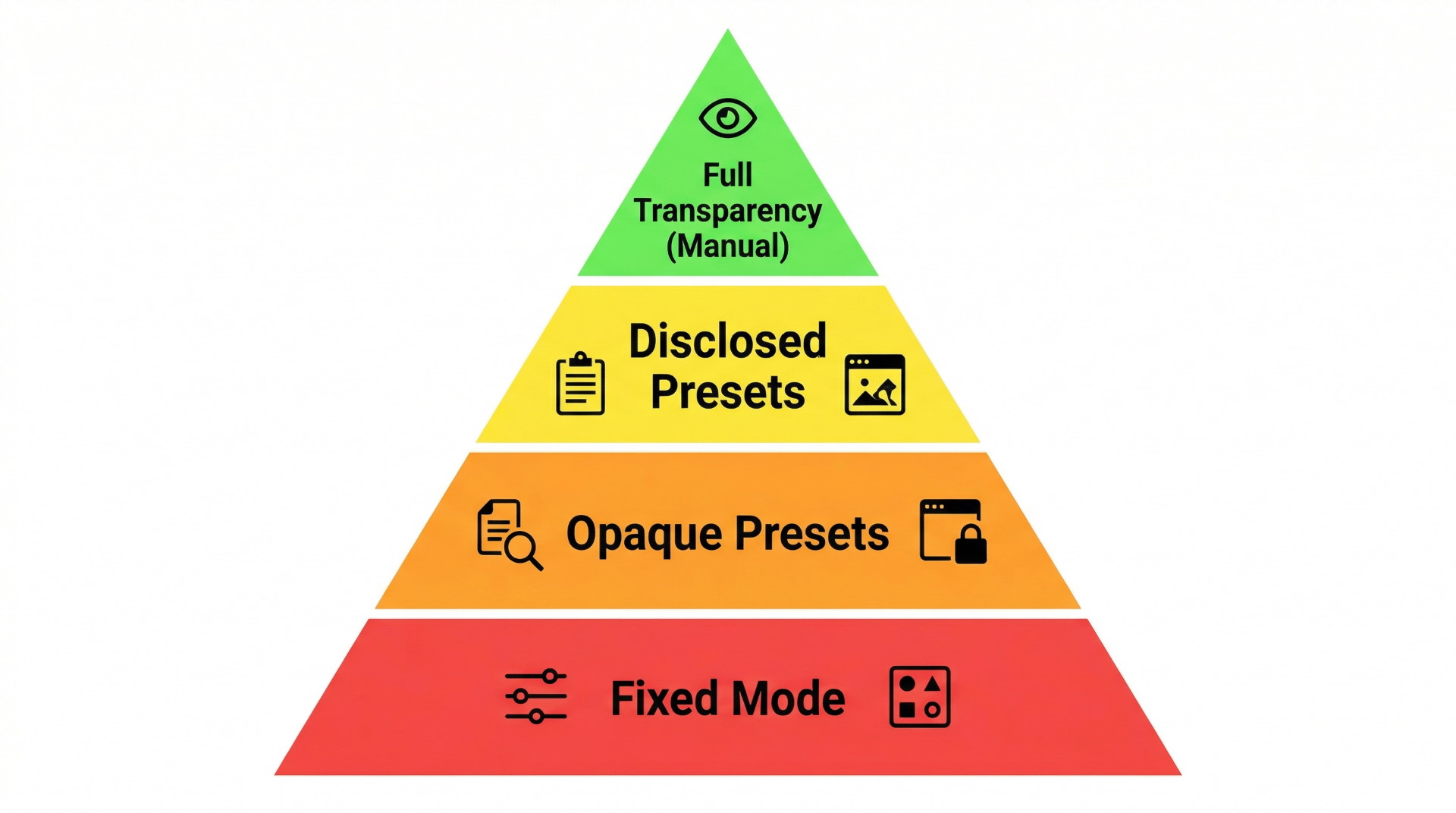
Hidden logic reduces comparison confidence. If you are evaluating two devices and one shows its operating parameters while the other does not, you are not making an equal comparison – you are comparing verified data against an unknown. The disclosure hierarchy runs from fully visible (all parameters displayed and adjustable) to partially visible (some values shown, some hidden) to fully hidden (only a mode name displayed).
Why Preset Opacity Weakens Comparison Quality
Preset opacity means the buyer cannot verify field behavior from the interface alone. Two devices with similarly named presets may not be comparable when sequence details are undisclosed. Brand A’s “Energy” mode and Brand B’s “Energy” mode could run at completely different frequencies and intensities – or they could be identical. Without disclosure, you have no way to know.
Opacity is a comparison problem, not direct proof of low quality or ineffectiveness. An opaque preset might work well – you simply cannot verify that from the controller interface, and you cannot compare it meaningfully to a disclosed alternative.
| Questions to Ask Before Comparing Presets
Does the manufacturer disclose the frequency, intensity, and duration for each preset? Are the values shown on the controller display during operation, or only in marketing materials? Can you verify during a session that the device is running what the label says? |
When “Proprietary” Labeling Reduces Verifiability
When a brand describes its technology as proprietary, the practical effect is often that the buyer receives less detail about how the program is defined. Proprietary does not inherently mean better or worse – but it does mean the specifications are withheld.
Claims about proprietary waveform purity are low-trust data points when they are not accompanied by disclosed parameters. Secrecy is not the same as superior disclosure. A buyer encountering proprietary claims should ask: what exactly is proprietary, and does that label replace or supplement visible specifications?
| Misconception Check
Misconception: “Proprietary technology” means the product uses advanced science others cannot match. Reality: “Proprietary” most often means the specifications are not publicly disclosed. That may reflect genuine trade secrets, or it may simply reduce the buyer’s ability to verify claims. |
Saving Custom Programs and What Customization Actually Means
Program customization can mean different things depending on the controller. At the basic end, it might mean adjusting the timer on a preset. In the middle, it might mean setting your own frequency and intensity within a preset framework. At the advanced end, it means building multi-step sequences with custom frequencies, intensities, and durations – and saving them as reusable programs.
Buyers should distinguish between adjustable settings and reusable custom programs. A device that lets you change frequency during a session but does not save your choices requires you to re-enter settings every time. A device with saveable sequence logic lets you build once and recall later. The word “customizable” covers both cases, which is why specificity matters.
Interface Design: LCD, LED, Buttons, Dials, Touchscreens, and Apps
The physical interface shapes what you can see and do with the controller. Button-based controllers may display parameters on an LCD or LED screen with limited real estate. Dial-based controllers may make adjustment smoother but can limit precision if there is no numeric display. Touchscreens offer more room for detailed displays but may introduce latency. Apps can provide the richest visual interface but tie the device to a phone.
A modern-looking interface does not automatically mean more transparent control. A touchscreen running opaque presets offers no more parameter visibility than a button-based controller running opaque presets. The useful question is not which interface looks best, but which interface shows you the most about what the device is actually doing.
| Interface Type | Typical Visibility | Adjustment Style | Key Limitation |
| LCD + Buttons | Numeric display of active parameters | Step-through menus, up/down buttons | Small screen may show one parameter at a time |
| LED only | Status indicators, minimal text | Limited selection via button press | Low information density |
| Dial + Display | Analog or digital readout | Continuous rotation for value changes | Precision depends on display feedback |
| Touchscreen | Multi-parameter display, graphical presets | Tap and swipe navigation | Latency possible; may still run opaque presets |
| Smartphone App | Full graphical interface, session logs | Touch input on phone screen | Depends on app availability and phone connection |
Display Quality Matters More Than Display Style
A touchscreen does not automatically produce better disclosure than a button-based controller, and an app does not automatically produce better disclosure than a small LCD screen. A basic display that shows exact frequency, intensity, timer, and mode details can be more useful than a larger interface built around attractive but opaque preset names.
The real comparison factor is display fidelity: how accurately and consistently the interface reflects the active operating state of the device. Buyers should judge the controller by what it reveals, not by how modern the interface feels.
Trade-Offs Buyers Should Understand Before Comparing Controllers
Controller comparison is not a straight ranking from worst to best. Each architecture involves trade-offs between simplicity, transparency, flexibility, and user burden. Understanding those trade-offs helps you choose based on your actual priorities rather than on feature-list impressions.
Simplicity Versus Transparency
Lower-effort interfaces reduce user burden. A single-button controller is easy to use and requires no parameter knowledge. But simpler interfaces may also reduce parameter visibility – if the device does not show what it is doing, you cannot verify or compare its behavior.
The right fit depends on what you want to verify and manage. If you want a device you can turn on and forget, a fixed or simple preset controller may suit your workflow. If you want to understand and compare operating specifications, you need a controller that shows them.
Manual Flexibility Versus User Knowledge Burden
More manual options can increase transparency and adjustment depth. They can also overwhelm a user who does not know what values to select. This is a fit and complexity issue, not an efficacy ladder. A buyer who sets parameters incorrectly out of confusion is not better served than one who uses a well-designed preset.
Manual control is a trade-off, not a superiority marker. It suits detail-oriented buyers who have or are willing to develop parameter literacy. It does not suit buyers who want simplicity above all. Neither preference is wrong.
App-Only Control as Convenience Versus Dependency
App-only systems offer convenience, update flexibility, and richer visual interfaces. They are constrained by phone dependence, software maintenance, and long-term compatibility. If the manufacturer stops supporting the app, the device may lose its entire control interface.
This is a practical ownership consideration. Buyers should weigh whether the convenience of app-based control justifies the dependency on a software ecosystem they do not own. A device with a standalone physical controller remains operable regardless of software changes.
More Presets Versus Better Disclosure
More preset modes do not automatically mean more power. A device with fifty opaque presets offers fifty labels. A device with five fully disclosed presets offers five sets of verifiable specifications. Quantity without disclosed sequence logic weakens comparison usefulness.
Disclosure quality is more useful than raw mode count for specification literacy. When evaluating a controller, the question is not how many modes it has, but how much it tells you about what those modes actually do.
Buyer Profiles Without Turning the Page into a Recommendation
| Buyer Preference | Controller Pattern That Usually Fits Best | Why |
| Lowest interaction burden | Fixed or simple preset-based controller | Fewer decisions and less setup complexity |
| Better disclosure and visibility | Manual or transparent hybrid controller | More active values are visible and comparable |
| Convenience with richer interface | Transparent app-based or hybrid system | Larger interface can improve visibility if the app exposes real settings |
| Minimal decision fatigue with some transparency | Preset system with disclosed sequences | Keeps workflows simple while preserving some comparability |
This table is not a recommendation ladder. It simply maps controller types to common buyer preferences. The same controller design can fit one buyer well and another poorly depending on whether the buyer values simplicity, visibility, or software convenience more highly.
Limits of What the Interface Can Prove About Field Behavior
The interface can display values or labels, but it cannot prove therapeutic outcomes. Visible parameters improve verifiability of settings – you can confirm that the device is set to 10 Hz and 20 µT. That is a verifiable engineering claim. Whether 10 Hz at 20 µT produces a specific health benefit is a separate question that the interface cannot answer.
Health-claim links tied to named modes are governance-restricted. No controller display, however detailed, substitutes for independent clinical evidence. The interface proves what the device is set to do, not what that setting accomplishes biologically.
Edge-Case Factors: Interface Latency and Controller-Side EMI
Interface latency refers to how quickly the controls and display respond when you make a change. On most devices this is imperceptible, but touchscreen or app-based controllers may introduce noticeable delay, especially over Bluetooth connections. It is a usability consideration, not a primary buying driver.
Controller-side electromagnetic interference (EMI) is an edge-case design concern. The controller’s own electronics can theoretically produce stray electromagnetic signals separate from the intended PEMF output. For most buyers, this is not a decision-making factor – it is a design-quality detail that advanced users or those with specific sensitivity concerns may want to investigate further.
Minimum Controller Disclosure Threshold Before Comparison Becomes Reliable
A controller becomes meaningfully useful for comparison when the buyer can identify at least three things: what values the interface actually displays, which of those values are adjustable, and whether presets reveal or hide their underlying sequence logic. A fourth layer – whether custom settings can be saved and recalled – improves the comparison further but is not required to establish basic transparency.
This is not a product verdict. It is a disclosure rule. The less the controller reveals about what it is doing, the more the buyer is being asked to trust labels instead of specifications.
FAQ
What does a PEMF controller actually control?
A PEMF controller governs operating variables including frequency, intensity, timing, and program selection – when those values are exposed. It functions as the device’s signal-generation and control layer, determining what electromagnetic pulses the coils produce.
What is the difference between a preset mode and a manual setting on a PEMF device?
A preset mode bundles multiple settings behind a single label – you select the program and the device runs a predefined sequence. A manual setting exposes individual parameters for the user to adjust directly. The main trade-off is simplicity versus transparency.
Are fixed-mode PEMF mats the same as preset-based mats?
No. Fixed-mode devices typically offer one operating cycle with minimal or no user-defined changes. Preset-based devices allow switching among multiple preloaded programs. Both limit direct parameter access, but preset systems offer more variety in operating routines.
What does Hz mean on a PEMF controller?
Hz (hertz) indicates the number of electromagnetic pulses per second the device generates. A display showing 10 Hz means the coils pulse ten times per second. Whether Hz is visible depends on the controller’s design – not all devices display this value.
What does Gauss or microtesla mean on a PEMF controller?
Gauss and microtesla (µT) are units of magnetic field strength. One Gauss equals 100 microtesla. Some controllers display intensity in one unit or the other; some use relative labels like Low/Medium/High instead. Disclosure varies by device.
Why does parameter visibility matter when comparing PEMF devices?
Visible parameters let you compare what two devices actually do at the operating level. When parameters are hidden, comparison relies on marketing labels rather than specifications. More visibility means more informed comparison – not better health outcomes.
What is preset opacity on a PEMF controller?
Preset opacity describes a situation where the buyer cannot verify what a preset is actually doing from the interface alone. The underlying frequency, intensity, and timing sequence are hidden behind a mode name. Opacity is a disclosure limitation, not automatic proof that the preset is low quality.
Do more preset modes mean a PEMF device is more powerful?
No. More preset modes mean more labeled programs. Without disclosed specifications for each mode, additional presets add variety in names, not verifiable capability. Disclosure quality matters more than mode count.
Is manual control always better than preset modes?
No. Manual control offers more direct adjustment and transparency but requires more parameter knowledge. For buyers who prefer simplicity or lack technical background, well-designed presets with disclosed values can be equally appropriate. It is a fit question, not a quality hierarchy.
What does it mean when a PEMF brand calls a waveform proprietary?
Proprietary wording typically means the buyer receives less detail about how the program or waveform is defined. This is a disclosure issue – it does not prove the technology is superior or inferior. It means the specifications are withheld.
Can a preset label tell you what frequency sequence is being used?
Only if the brand discloses it. A preset label alone – such as “Recovery” or “Deep Sleep” – may not reveal the underlying sequence. Some manufacturers publish detailed sequences; others keep them proprietary. The label is the name, not the specification.
What is pulse-width modulation in a digital PEMF controller?
Pulse-width modulation (PWM) is a digital control method that rapidly switches output on and off to approximate waveform shapes. It is standard in digital electronics and should not be treated as automatic proof of waveform superiority or proprietary innovation.
Can you save custom programs on every PEMF controller?
No. Saveable custom programs are available on some controllers but not all. Many devices allow temporary adjustments that reset after each session. Buyers should distinguish between devices that allow in-session changes and those that let you build and store reusable program sequences.
Are app-controlled PEMF devices more flexible than button-based controllers?
App control can offer greater interface flexibility – larger displays, graphical layouts, and session logging. But flexibility depends on what settings the app actually exposes. A button-based controller that shows frequency, intensity, and timer can be more transparent than an app running opaque presets.
Is app-only control a feature or a limitation?
It can be both. App-only control offers convenience and update potential but creates dependency on a phone, Bluetooth connection, and the manufacturer’s ongoing software support. Whether this is acceptable depends on how much ownership risk the buyer is comfortable with.
Does a touchscreen or app make a PEMF controller more transparent?
Not automatically. Transparency depends on what values and sequences the interface actually shows, not on the display technology. A touchscreen running opaque presets is no more transparent than a button-based controller running the same opaque presets.
What should a buyer look for on a PEMF controller display?
Look for visible frequency (Hz), visible intensity (Gauss or µT) if provided, adjustable timer controls, and clarity about what each preset actually contains. Judge the display by what it discloses, not by how modern it looks.
Can the controller interface prove a health claim tied to a mode name?
No. The controller interface can show operating parameters, but it cannot prove that a specific setting produces a health benefit. Health claims tied to mode names are not validated by the interface – they require independent clinical evidence.
Why are lifestyle preset names weak comparison data?
Names like Relax, Sleep, or Recovery describe marketing intent, not disclosed operating behavior. Two brands may use the same name for entirely different frequency and intensity combinations. Comparison is stronger when the underlying values are visible.
What are the main buyer trade-offs between fixed, preset, and manual PEMF control systems?
Fixed systems offer simplicity but minimal transparency. Preset systems add variety and convenience but may hide specifications. Manual systems offer transparency and adjustment depth but require more user knowledge. Hybrid systems blend these qualities with varying degrees of disclosure. The right choice depends on your priorities – simplicity, visibility, customization, or some combination.
Does interface latency matter on a PEMF controller?
Interface latency – the delay between making a change and seeing the response – can affect usability, especially on app-based or Bluetooth-connected devices. For most buyers, it is a minor consideration rather than a primary decision factor.
Can the controller itself create interference concerns?
Controller-side electromagnetic interference (EMI) is a design concern in some edge cases, where the controller’s own electronics may produce stray signals. For most buyers, this is a secondary evaluation factor rather than a core purchasing signal.
What is the simplest PEMF controller type for a beginner?
Fixed-mode or simple preset-based controllers tend to feel easiest for beginners because they reduce setup decisions. This is a usability fit statement – not a performance recommendation. A simpler controller may suit a beginner’s workflow even if it offers less parameter visibility.
What is the most disclosure-friendly PEMF controller type for a detail-oriented buyer?
Manual or hybrid controllers that expose actual frequency, intensity, and timer values tend to be the most disclosure-friendly. The advantage is transparency and verifiability – you can see and compare what the device is doing. This does not guarantee better outcomes; it guarantees better-informed comparison.

The PEMF Advisor Editorial Team reviews consumer PEMF mats and related wellness devices. Our work focuses on verified specifications, documentation, usability, materials, warranty/returns, and ownership considerations. We do not provide medical advice or evaluate health outcomes. See our Review Methodology and Editorial Standards.